


Mobile Security & Antivirus
4.611.46K Reviews
App Specs
- Version
- 17.1.0
- Updated On
- License
- Free
- Downloads
- 5,000,000+
- Developer
- Trend Micro
- Categories
- Tools
- Platform
- Android, iOS
Screenshots





 Analysis by AppCompare
In today's digital world, where our lives revolve around smartphones, ensuring the safety of our data is more crucial than ever. That’s where Mobile Security & Antivirus steps in, offering a way to handle everyday security concerns from one place. I find the appeal less about expecting an app to make a phone invulnerable and more about having a repeatable routine for checking it, spotting risks, and making sensible choices before a problem grows.
A useful baseline for everyday phone security
Trend Micro’s Mobile Security & Antivirus is a free tools app for Android, with optional in-app purchases ranging from $2.99 to $49.99 per item. It has a 4.6 average from around 135,000 ratings, and more than 5 million installs. The app is rated for Everyone, and version 17.1.0 supports Android 5.0 and later. Those details make it an option for a broad range of Android users, though a compatible operating system is only the starting point; I’d still check that my device and the features I care about work as expected before relying on it.
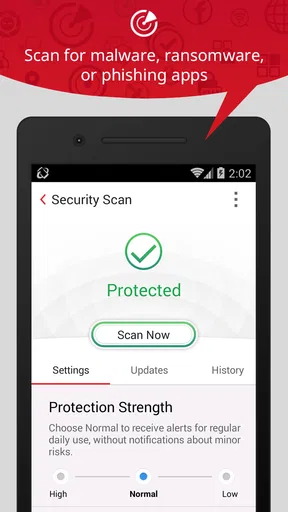
My preferred starting routine is simple: open the app, review its current security status, run a scan when I have reason to check the phone, and deal with any warning before moving on. That sequence is more useful than installing a security app and forgetting it. A scan can help identify a concern, but the result still calls for judgment: I would check which app or file is involved and decide whether I recognize it before removing anything. Treating every alert as an automatic emergency can lead to rushed decisions.
The app brings together malware checking with tools aimed at scams, unwanted messages, and VPN use. That breadth is convenient if I want several security tasks in one place. It also means I would not assume every tool is equally relevant to my habits. Someone who mainly installs apps from sources they trust may get more value from occasional checks, while a person who often follows links from texts or uses unfamiliar networks may care more about the scam and connection safeguards.
Settings that shape the experience
I’d spend a little time with the settings before deciding how much attention the app should demand. Security alerts are helpful only if they are noticeable enough to act on without becoming so frequent that I start dismissing them automatically. If notifications feel intrusive, I would adjust them rather than turning off every warning at once. Keeping alerts for meaningful risks while reducing less useful prompts is a better balance than either constant interruption or silence.
It is also worth checking what each tool is asking you to do and when it matters. A VPN is a separate part of a security routine from a malware scan: I would think about it when using a connection I do not control, rather than treating it as proof that every online activity is safe. Likewise, a warning about a message or possible scam is a prompt to pause and verify the sender through a trusted route, not an invitation to follow the message’s own instructions.
One practical habit is to review the app after a change in how you use your phone. If you start installing unfamiliar apps, travel and use more public connections, or receive a sudden run of suspicious texts, revisit the relevant settings and tools. This makes the app more useful than leaving its initial setup untouched. It also avoids enabling every option without understanding the interruptions, access, or recurring attention that may come with it.
Worth Reading Before You Choose

EA SPORTS FC Mobile 26 Is a Bigger Football Game, but It Takes Time

Flipboard Shows What News Apps Must Do Beyond the Feed

Switching to Android Auto Means Rethinking Your Driving Routine

Google Calendar Makes a Crowded Week Easier to Manage

Ludo King Makes the Most of the Minutes Between Plans

Baby Panda World Brings Quick Play to Modern Phones, but Its Game Library Feels Busy
Faster patterns without skipping the important checks
Experienced users can make security checks feel less like a chore by tying them to existing habits. I might review the app after installing something new, before a trip, or after receiving a message that seems to impersonate a service I use. These moments provide a reason to check rather than encouraging constant scanning for its own sake. If the app offers a shortcut on the screen I already use, placing it within easy reach can make a quick review easier; I would rely only on controls actually available on my device, not assume a particular shortcut exists.
For a realistic example, imagine I receive a delivery text while out and the link asks me to confirm account details. I would avoid tapping it, open the relevant service independently, and use the app’s scam-related protection as one part of that check. If I am on public Wi-Fi, I would consider whether the VPN tool suits that session too. The useful lesson is the order: pause first, verify through a separate route, then choose the appropriate protection. No scanner or VPN can make a deceptive message trustworthy.
For a lost-phone concern, I would first use the device’s own account and recovery options, then consider any anti-theft tools that are actually available in my installed version. Remote locking or wiping can have serious consequences, especially if I have not secured a recent backup, so I would not treat a wipe as a casual first response. Knowing where recovery controls are before a phone goes missing is more valuable than trying to learn them under pressure.
Where this app fits among alternatives
Compared with relying only on Android’s built-in protections, a dedicated security app can put additional checks and tools together in a more visible routine. That can suit someone who wants a central place to think about malware, suspicious messages, and VPN use. The trade-off is another app to configure and maintain, plus the need to decide which alerts deserve attention. A careful user who installs apps selectively and is comfortable with the phone’s existing safeguards may prefer not to add that extra layer.
Compared with standalone VPN apps or tools focused only on spam, Mobile Security & Antivirus takes a broader approach rather than specializing in just one job. That convenience is useful if I want a single security companion, but it does not mean I would choose it automatically over a specialist. If my main need is a VPN with particular connection choices, I would compare those details directly. If I only want to block unwanted calls or messages, a focused tool may be simpler. The right choice depends on which problem I actually face most often.
The same caution applies to privacy and protection claims in general: I would use the app as one layer, not as permission to ignore updates, review app sources, or question unusual requests. Security software can help surface issues, but it cannot replace good account passwords, careful link handling, or a backup plan. That is the main trade-off of an all-in-one approach: it can simplify a routine, but it cannot take responsibility for every decision on the phone.
First Impressions and User Interface
Upon installing Mobile Security & Antivirus, I was greeted with a sleek and intuitive interface. It’s like the developers knew exactly how to make security feel less intimidating and more user-friendly. The home screen presents a simple dashboard with all the essential tools just a tap away. You don’t have to be a tech wizard to navigate through the options, which is a huge plus for casual users.
Features That Stand Out
This app packs a punch with its extensive range of features. The real-time protection is a game-changer, constantly monitoring for suspicious activity and blocking threats before they can cause harm. It's like having a digital bodyguard 24/7.
The malware scanner is another highlight. It quickly scans your device, identifying and eliminating any malicious software. I ran a scan on my phone, and it was impressively fast yet thorough, giving me peace of mind.
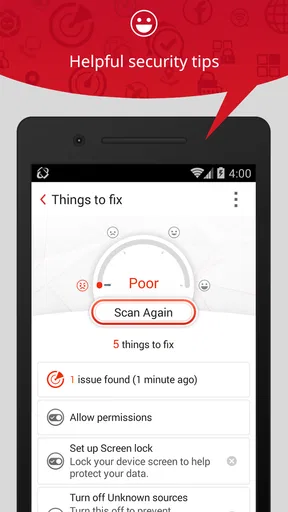
Another feature worth mentioning is the privacy advisor. This tool analyzes the permissions of installed apps and alerts you if any app is overstepping its boundaries. In an age where privacy is everything, this feature is invaluable.
Performance and Impact on Battery
One of my initial concerns was how demanding this app might be on my phone’s performance and battery life. Let’s face it, nobody wants an app that drains your battery like there’s no tomorrow. Thankfully, the app runs smoothly in the background without being a resource hog. I barely noticed any difference in my phone’s performance or battery levels, which was a pleasant surprise.
Additional Tools and Utilities
Beyond the standard antivirus and security features, the app offers some neat extras. The anti-theft feature is particularly nifty, allowing you to locate your phone if it gets lost or stolen. You can even remotely lock or wipe your device, ensuring your data doesn’t end up in the wrong hands.
There’s also a handy Wi-Fi security tool that checks the safety of networks before you connect. With so many public networks being potential minefields, this feature is a must-have.
Is It Worth It?
So, the big question: is the app worth downloading? Absolutely. It’s packed with features that not only protect your device but also enhance your overall mobile experience. The peace of mind it offers by keeping your data secure is invaluable.
Of course, no app is perfect. Some users might find the occasional pop-up notification a bit intrusive, but it’s a small trade-off for the level of security you’re getting. Plus, the notifications can be customized in the settings, which is a nice touch.
In conclusion, whether you’re tech-savvy or just a regular user, Mobile Security & Antivirus is a solid choice for anyone looking to safeguard their smartphone. It’s easy to use, packed with powerful features, and doesn’t compromise on performance. I’d recommend it to people who want several security tools in one place and are willing to keep their settings and habits sensible. If you only need one narrow function, or prefer to rely on built-in protections and careful behavior, another approach may be a better fit. Either way, the strongest protection comes from combining useful tools with thoughtful choices.
Pros
- Real-time threat detection capabilities.
- Comprehensive privacy protection features.
- User-friendly interface and navigation.
- Regular updates for latest threats.
- Low impact on battery and performance.
Cons
- Some features require a premium subscription.
- Occasional false positives in scans.
- Can be resource-heavy on older devices.
- Ads in the free version can be intrusive.
- Limited support for advanced users.
FAQs for Mobile Security & Antivirus
What features does the Mobile Security & Antivirus app offer?
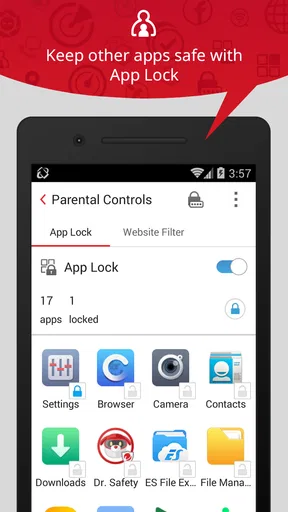
The Mobile Security & Antivirus app provides comprehensive protection for your device, including malware scanning, real-time threat detection, anti-phishing measures, and privacy protection. It also offers features like app locking, device tracking, and secure browsing to enhance your overall security. Regular updates ensure the app stays ahead of new threats.
Is the Mobile Security & Antivirus app compatible with all devices?
The Mobile Security & Antivirus app is designed to be compatible with a wide range of Android and iOS devices. However, it’s always recommended to check the app’s specifications and system requirements in the app store to ensure compatibility with your specific device model and operating system version.
Does the Mobile Security & Antivirus app drain battery quickly?
The Mobile Security & Antivirus app is optimized to minimize battery usage while running in the background. It uses advanced algorithms to perform scans efficiently without significantly impacting your device's battery life. Users typically report minimal battery drain, but performance may vary based on usage patterns and device specifications.
How effective is the Mobile Security & Antivirus app in detecting threats?
The Mobile Security & Antivirus app is highly effective in detecting a wide range of threats, including viruses, malware, spyware, and phishing attempts. It utilizes a robust database of known threats and employs real-time scanning to identify and neutralize risks swiftly. Users generally find it reliable for maintaining their device’s security.
Is there a free version of the Mobile Security & Antivirus app?
Yes, the Mobile Security & Antivirus app offers a free version with basic features, allowing users to perform essential security scans and receive threat alerts. For enhanced protection, a premium version is available, providing additional features such as advanced threat detection, priority support, and more frequent updates.


